TRAX Copilot
Finding the right records in a Learning Record Store usually means knowing your way around filters, remembering exact identifiers, and clicking through pages. TRAX LRS 4.0 Copilot changes that. It's an assistant that sits next to your data views and turns plain sentences into real, working filters — the same ones you'd set by hand, only faster.
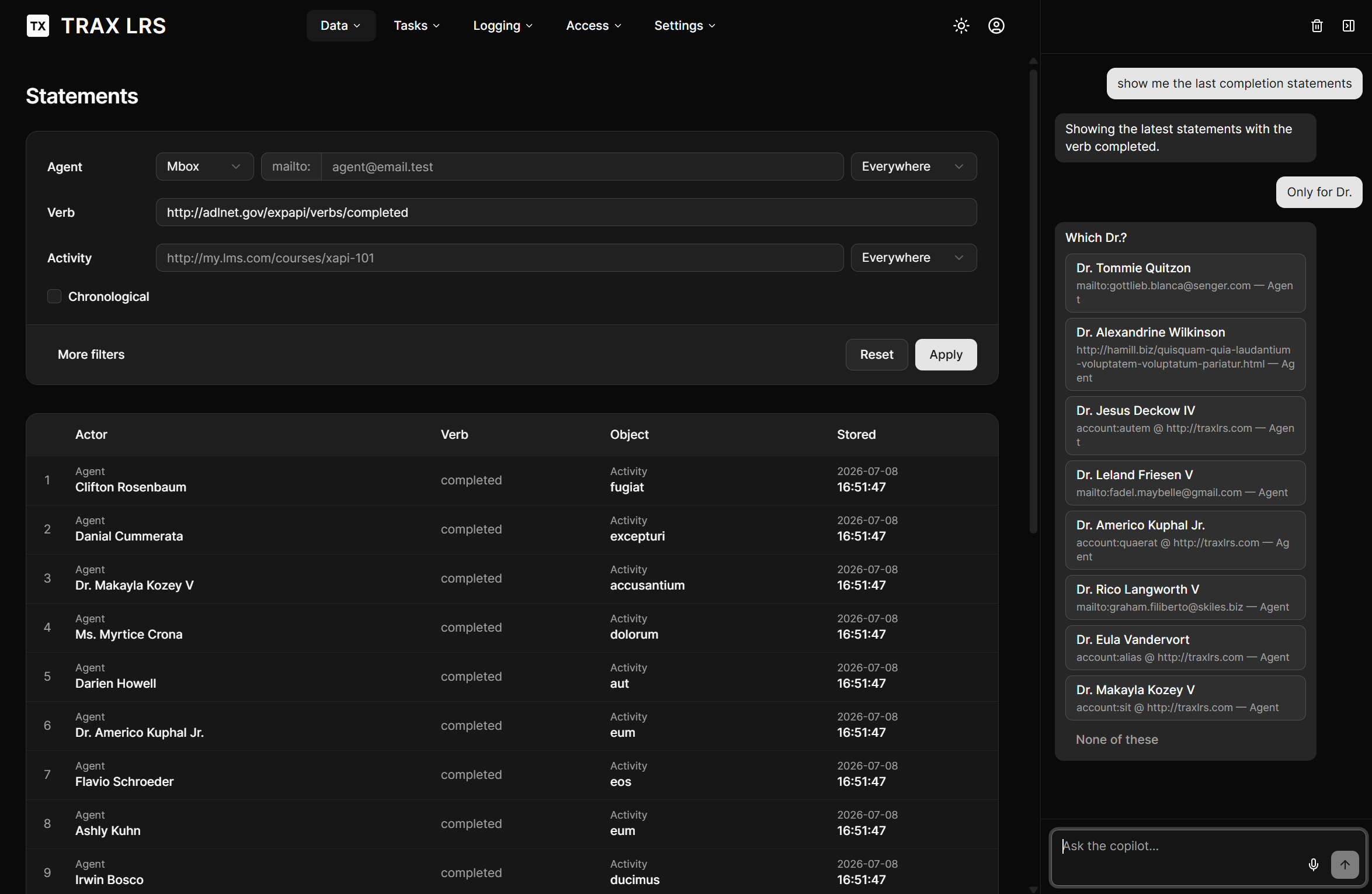
Let's build up from the simple to the surprising.
It drives the app for you
Start with the basics. Ask:
"Show the agents."
Copilot opens the Agents view and runs the search. No menu-hunting. It understands that "agents" names a page, so it goes there for you.
Change store mid-sentence:
"Switch to the Production store and show the activities."
It finds your Production store, activates it, and lists its activities. You never had to know its exact internal name — you called it what you call it.
It speaks your language, not the machine's
Here's where it gets useful. xAPI filters are precise: to filter statements by a verb, the system
technically needs the verb's full identifier, a long web address like
http://adlnet.gov/expapi/verbs/completed. Nobody wants to type that.
So just say the word:
"Show the statements with the verb completed."
Copilot recognises "completed" as a verb, looks up its real identifier in your store, fills the filter, and searches. You said a word; it handled the technical part.
The same works for content:
"Show the completion statements for the activity named Introduction to xAPI."
Two lookups happen quietly — the verb completed and the activity Introduction to xAPI — and the Statements view comes back filtered on both.
It handles "which one did you mean?"
People aren't identifiers. Ask about a person by name:
"Show the statements of Sébastien."
If one Sébastien matches, Copilot filters straight away. If several people match, it doesn't guess — it shows you a small card:
Which Sébastien?
- Sébastien Fraysse · mailto:sebastien@…
- Sébastien Andrieux · mailto:s.andrieux@…
- None of these
You pick one; it continues. This works for groups too (a class, a cohort), and even for stores when their names look alike.
Your data stays your data
A fair question with any AI feature: does it see my learners' records? The answer here is no. Copilot decides what to filter, but the results are fetched and displayed by the app itself — the records render in your table and are never sent to the model. Copilot only learns whether a page came back empty or not. It's an assistant that operates the controls, not one that reads your data over your shoulder.
Talk, or type
The panel is a simple chat docked to the right of your data pages. Type a request, or tap the microphone and say it out loud. Collapse the panel when you want the full screen; your conversation is still there when you come back. One button clears it and starts fresh.
Where this is heading
Today Copilot is great at piloting the existing views — navigating, filtering, resolving names. The next chapters are more ambitious:
-
Questions the standard filters can't express. Think "list every statement from this whole person, across all their identities" or "the five best scores on the xAPI 101 quiz." Copilot will translate these into real queries and show the answer on the page you already know.
-
Answers that build their own view. Some questions deserve more than a table — a chart, a ranking, a small dashboard. The plan is for Copilot to compose the right presentation on the fly, picking the best way to show what you asked for, without anyone pre-building a dashboard for it.
The direction is simple: an LRS you can ask, that answers with exactly the view your question needs. This first release — piloting your data views in natural language — is the foundation the rest is built on. Turn it on, open a data page, and start asking.