Copilot
Purpose
Copilot is an AI assistant that pilots the data views from natural language. You type (or dictate) a request; Copilot performs the matching actions in the UI: it navigates between views, switches the active store, sets filters, runs searches, opens item details, and — when your request names something by word rather than by identifier — resolves that name to the identifier the filter needs.
Current scope
- Navigation & store — go to a data view, switch the active store by name.
- Filtering & search — set a view's filters and run the query; results appear in the normal table.
- Name resolution — turn everyday words into the exact identifiers xAPI filters require: a person or group (an actor), a verb, an activity, an activity type, a profile, a MIME type, a store.
- Disambiguation — when a name matches several candidates, it asks you to pick one.
Boundaries
- Extended edition only. Copilot does not ship with the Starter edition.
- Data views only. It drives the data-exploration pages, not the admin/settings/task pages.
- It never sees your records. Search results render in the UI and are never sent to the model; Copilot only learns whether the current page came back empty. It reports what it filtered, never a count of results.
- Ready-to-use values, or resolvable names. If a value is neither a valid identifier nor something a resolver can look up, Copilot asks you for a usable value instead of guessing.
Configuration
Copilot is off by default. It is configured through environment variables.
| Variable | Default | Purpose |
|---|---|---|
AI_COPILOT |
false |
Master switch. true enables the panel and the backend endpoint. When off, the UI panel is hidden and the API returns 404. |
AI_PROVIDER |
openai |
The LLM provider (via the provider-agnostic Laravel AI SDK — swappable without code changes). |
AI_MODEL |
(empty) | The model id. Empty = the provider's default text model. |
AI_TIMEOUT |
60 |
Per-request timeout, in seconds. |
SERVICE_COPILOT_HOST |
APP_URL |
Only for distributed deployments — the host of the copilot service. In a monolith, leave as is. |
The provider API key is supplied through the Laravel AI SDK's own configuration (for OpenAI, the
standard OPENAI_API_KEY). After enabling, rebuild the front-end assets (npm run build) if the panel
does not appear.
The interface
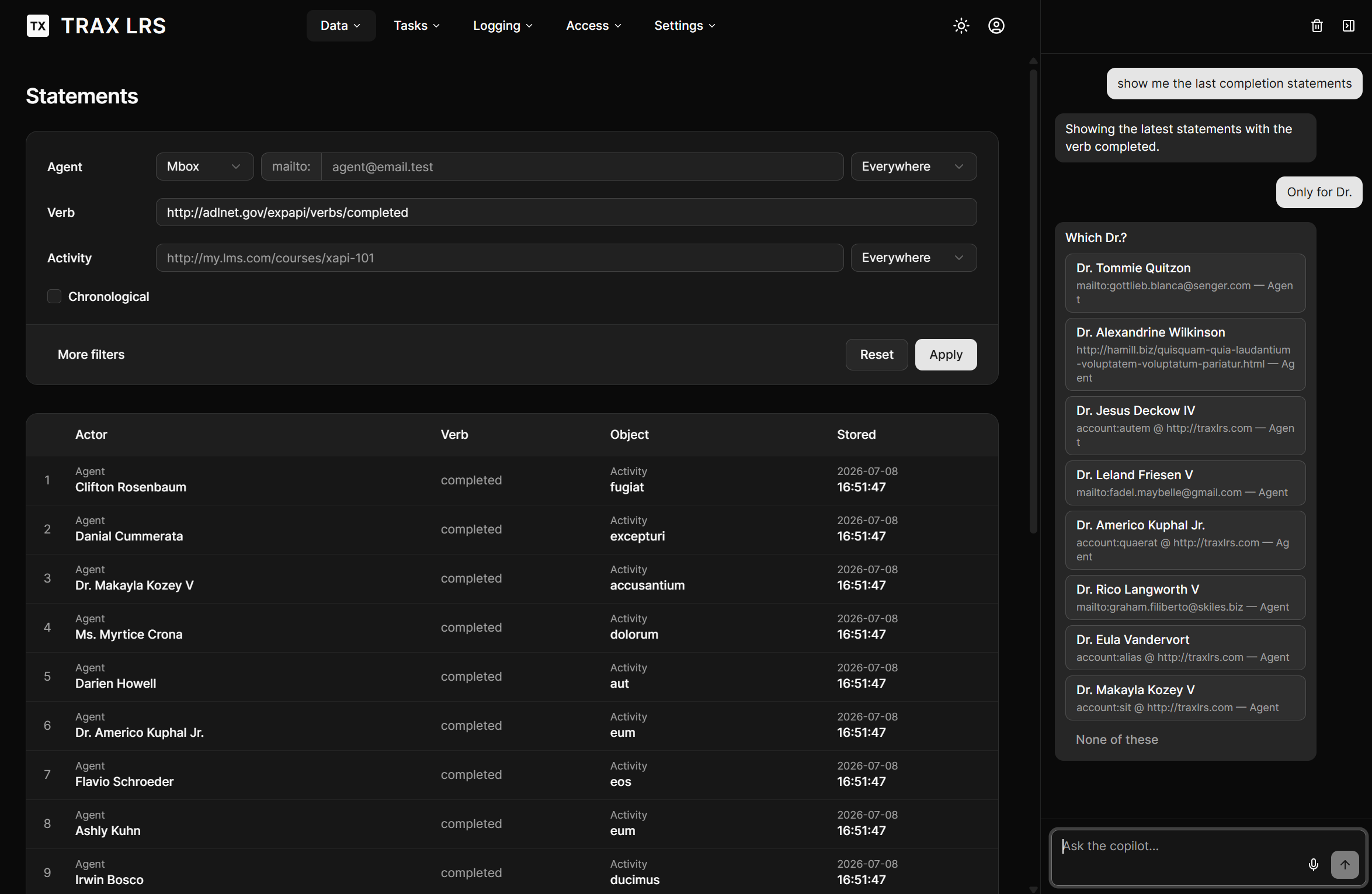
Copilot appears as a chat panel docked to the right of the data pages, below the header, beside the content (it does not overlay the table).
Examples
Each example shows the prompt, the sequence of actions Copilot performs, and a short note on what happens behind the scenes. Action names are the app's own UI actions.
1. Go to a view
Show the agents.
Copilot recognises "agents" as a view name, navigates there, and runs the search with no filters. The list fills the table.
2. A free-text filter (no lookup needed)
Show the initialized verbs.
"verbs" routes to the Verbs view. There, the filter is a plain free-text match, so the word "initialized" is used as-is — no identifier lookup required.
3. Switch store by name
Switch to the Production store and show the activities.
Copilot looks up your store by the name you used to find its internal slug, activates it, then lists that store's activities. Only stores you can access are considered.
4. Filter by a verb word
Show the statements with the verb completed.
The statements verb filter needs the verb's full identifier (a long IRI), not a word. Copilot asks the vocabulary service for the identifier that matches "completed" in your store, fills the filter, and searches.
5. Filter by an actor's name (with disambiguation)
Show the statements of Sébastien.
Copilot resolves the person's name to an actor identifier. One match → it filters immediately. Several matches → it shows the choice card and waits for your pick. Works for groups (a class/cohort) too — each candidate is tagged Agent or Group.
6. Combine a verb and a named activity
Show the completion statements for the activity named Introduction to xAPI.
Two lookups run first — the verb concept "completion" → completed, and the activity by its name → its IRI — then both filters are set together and the query runs.
7. Open a specific result
Open the first one (after a search)
Copilot opens the detail panel for the first loaded row. The record is shown to you in the UI — it is not sent to the model.
The vocabulary service and the indexing tasks
Most of Copilot's "understand a name" ability is powered by the Vocab service. It keeps a compact, searchable index of your store's entities.
This index is maintained automatically: as statements are recorded, the vocabulary is kept up to date in the background. In normal operation you don't have to do anything.
However, in some circonstances, you may need to rebuild the indexes thanks to the new indexing task.